Non-Linear & Polynomial Features
Making Linear Models Curvy
OLS finds the best straight line. But real business data rarely behaves linearly. Polynomial features let you fit curves using the same linear algebra you already know: add $x^2$, $x^3$, interaction terms as new columns, then apply OLS as usual.
Why Go Beyond Linear?
| Business scenario | Why it curves |
|---|---|
| Ad spend vs revenue | Diminishing returns — first dollars convert, last ones do not |
| Price vs demand | Steep drop at first, then flattens |
| Employee count vs output | Efficiency peaks, then overhead grows |
| Product age vs defect rate | Bathtub curve — high early, low mid-life, high again at end |
What Is a Polynomial Feature?
A polynomial of degree in one variable:
This is still linear in the parameters . We rewrite it as where:
For two original features at degree 2, PolynomialFeatures expands to:
The interaction term captures joint effects — e.g. TV advertising combined with radio spend.
Polynomial terminology
A polynomial of degree is a function of the form:
Visual Flow — Polynomial Pipeline
Scaling after polynomial expansion is essential — has a very different range than .
Polynomial Shape Gallery
%matplotlib inline
import numpy as np
import matplotlib.pyplot as plt
import warnings
warnings.filterwarnings('ignore')

x_vars = np.linspace(-2, 2, 200)

fig, axes = plt.subplots(1, 3, figsize=(14, 4))

axes[0].plot(x_vars, x_vars**2, color='steelblue', linewidth=2)
axes[0].set_title('Quadratic $x^2$')
axes[0].legend(['$x^2$'])

axes[1].plot(x_vars, x_vars**3, color='tomato', linewidth=2)
axes[1].set_title('Cubic $x^3$')
axes[1].legend(['$x^3$'])

axes[2].plot(x_vars, x_vars**3 + 2*x_vars**2 + x_vars + 1, color='green', linewidth=2)
axes[2].set_title('Mixed degree-3')
axes[2].legend(['$x^3 + 2x^2 + x + 1$'])

for ax in axes:
    ax.axhline(0, color='grey', linewidth=0.6, linestyle='--')
    ax.axvline(0, color='grey', linewidth=0.6, linestyle='--')

plt.suptitle('Polynomial shape gallery', y=1.02)
plt.tight_layout()
plt.show()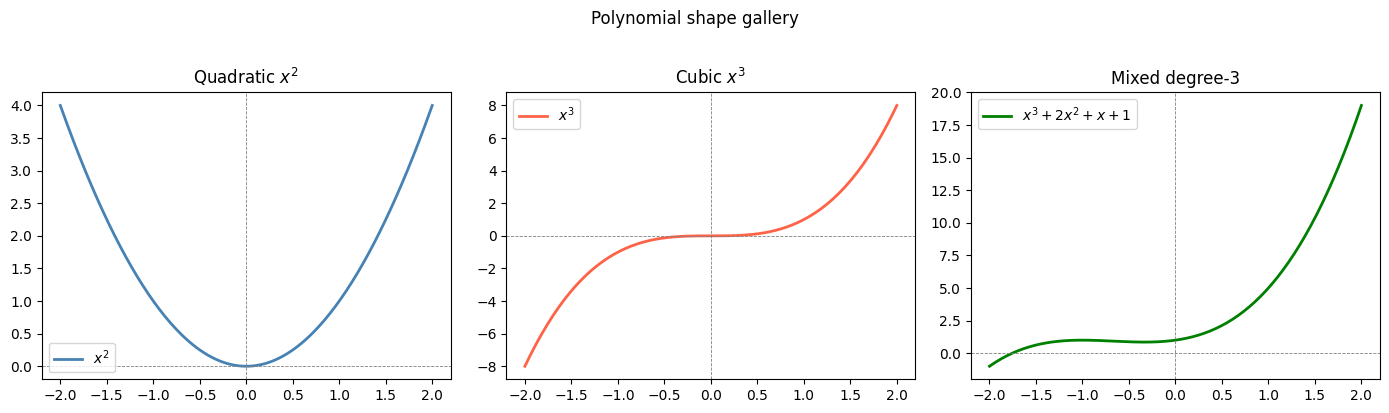
scikit-learn Pipeline: Fit Multiple Degrees
The canonical sklearn pattern: PolynomialFeatures → StandardScaler → LinearRegression.
%matplotlib inline
from sklearn.preprocessing import StandardScaler, PolynomialFeatures
from sklearn.pipeline import make_pipeline
from sklearn.linear_model import LinearRegression
import numpy as np
import matplotlib.pyplot as plt

np.random.seed(42)
m = 100
X = 6 * np.random.rand(m, 1) - 3
y = 0.5 * X**2 + X + 2 + np.random.randn(m, 1)

X_new = np.linspace(-3, 3, 200).reshape(-1, 1)

fig, ax = plt.subplots(figsize=(10, 5))
for style, width, degree in (("r-+", 2, 1), ("b--", 2, 2), ("g-", 1, 10), ("m-", 1, 20)):
    pipe = make_pipeline(
        PolynomialFeatures(degree=degree, include_bias=False),
        StandardScaler(),
        LinearRegression()
    )
    pipe.fit(X, y)
    label = f"{degree} degree{'s' if degree > 1 else ''}"
    ax.plot(X_new, pipe.predict(X_new), style, label=label, linewidth=width)

ax.plot(X, y, "k.", alpha=0.4, label="Training data")
ax.set_ylim(-2, 12)
ax.legend(loc="upper left")
ax.set_xlabel("$x$")
ax.set_ylabel("$y$")
ax.set_title("Polynomial regression — degree comparison")
plt.tight_layout()
plt.show()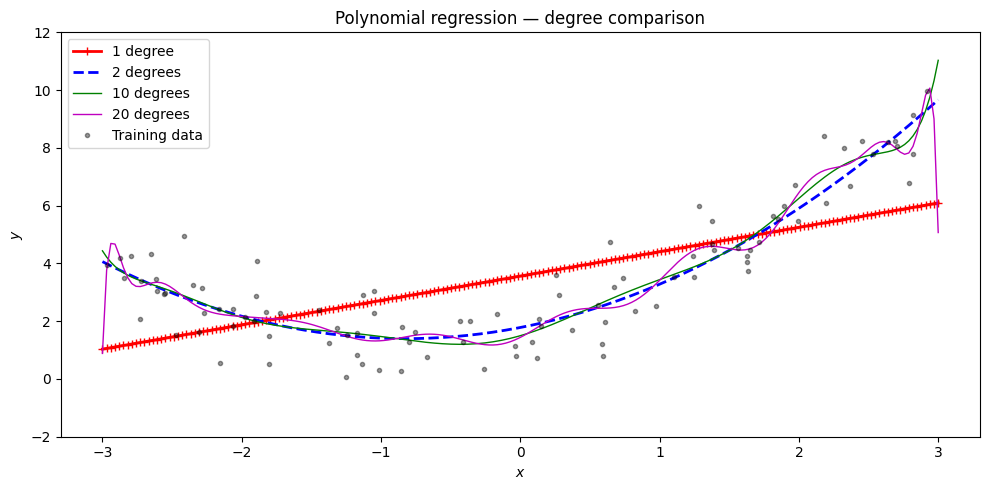
Exploring the Expanded Feature Matrix
import numpy as np
from sklearn.preprocessing import PolynomialFeatures

# Single-feature expansion
X_sample = np.array([[2.0], [3.0]])
for degree in [1, 2, 3]:
    pf = PolynomialFeatures(degree=degree, include_bias=True)
    Xp = pf.fit_transform(X_sample)
    names = pf.get_feature_names_out(['x'])
    print(f"Degree {degree}: features={list(names)}")
    print(f"  Row 0 values: {Xp[0]}")

print()
# Two-feature expansion — shows interaction term
X2 = np.array([[2.0, 3.0]])
pf2 = PolynomialFeatures(degree=2, include_bias=True)
Xp2 = pf2.fit_transform(X2)
print("Two features, degree 2:")
print("  Features:", list(pf2.get_feature_names_out(['TV', 'Radio'])))
print("  Values:  ", Xp2[0])
Degree 1: features=['1', 'x']
Row 0 values: [1. 2.]
Degree 2: features=['1', 'x', 'x^2']
Row 0 values: [1. 2. 4.]
Degree 3: features=['1', 'x', 'x^2', 'x^3']
Row 0 values: [1. 2. 4. 8.]
Two features, degree 2:
Features: ['1', 'TV', 'Radio', 'TV^2', 'TV Radio', 'Radio^2']
Values: [1. 2. 3. 4. 6. 9.]
Intuition: Feature Space Expansion
Think of polynomial feature generation as bending the feature space:
Original 2D space: data points in vs — the relationship is curved.
Transformation: create as a new feature. Each point now lives in a 3D space .
Fit in the new space: in 3D, a flat plane fits the data well — linear regression works.
Map back: the flat plane in space becomes a parabola in the original space.
The model stays linear in , but its decision surface in the original space is non-linear.
Under the Hood — Polynomial Regression from Scratch
The functions below implement polynomial feature generation and fitting via gradient descent without sklearn.
%matplotlib inline
import numpy as np
import matplotlib.pyplot as plt

def generate_polynomial_features(X, degree):
    """Return matrix where column i is X^(i+1), for i in 0..degree-1."""
    n_samples = X.shape[0]
    poly_features = np.empty((n_samples, degree))
    for i in range(1, degree + 1):
        poly_features[:, i - 1] = X ** i
    return poly_features

def fit_polynomial_regression(X_poly, y, learning_rate=0.01, n_iterations=1000):
    """Fit polynomial regression via gradient descent; returns coefficient vector."""
    n_samples, n_features = X_poly.shape
    coefficients = np.random.randn(n_features)
    X_poly = np.concatenate((np.ones((n_samples, 1)), X_poly), axis=1)
    coefficients = np.concatenate(([0], coefficients))
    for _ in range(n_iterations):
        y_predicted = np.dot(X_poly, coefficients)
        error = y_predicted - y
        gradients = (1 / n_samples) * np.dot(X_poly.T, error)
        coefficients -= learning_rate * gradients
    return coefficients

def predict_polynomial(X, coefficients):
    degree = len(coefficients) - 1
    X_poly = generate_polynomial_features(X, degree)
    X_poly = np.concatenate((np.ones((X.shape[0], 1)), X_poly), axis=1)
    return np.dot(X_poly, coefficients)

np.random.seed(42)
n_samples = 30
X_train = np.sort(np.random.rand(n_samples))
true_fn  = lambda x: np.cos(1.5 * np.pi * x)
y_train  = true_fn(X_train) + np.random.normal(0, 0.1, n_samples)

degrees = [3, 7, 15]
X_test  = np.linspace(0, 1, 100)

fig, axes = plt.subplots(1, 3, figsize=(14, 4))
for ax, degree in zip(axes, degrees):
    X_poly = generate_polynomial_features(X_train, degree)
    coef   = fit_polynomial_regression(X_poly, y_train, learning_rate=0.1, n_iterations=5000)
    y_pred = predict_polynomial(X_test, coef)
    ax.plot(X_test, true_fn(X_test), 'k-', label='True function')
    ax.plot(X_test, y_pred, 'r-', label=f'Degree {degree}')
    ax.scatter(X_train, y_train, edgecolor='b', s=20, label='Samples')
    ax.set_xlim(0, 1); ax.set_ylim(-2, 2)
    ax.legend(loc='best'); ax.set_title(f'Degree {degree}')

plt.suptitle('Polynomial regression from scratch (GD)', y=1.02)
plt.tight_layout()
plt.show()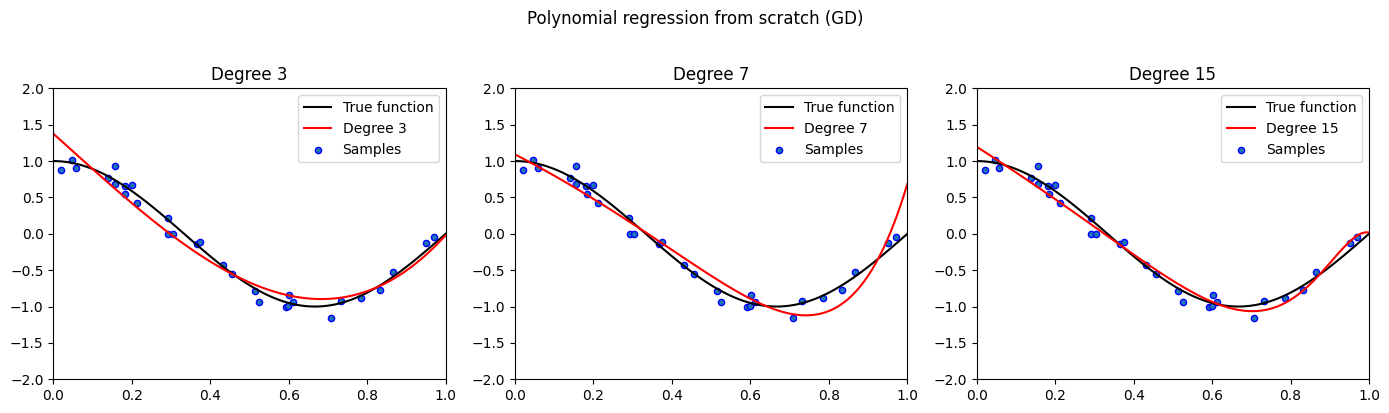
SVD-Based Polynomial Regression
For higher-degree polynomials, direct matrix inversion is numerically unstable. The PolynomialRegressionSVD class uses scipy.linalg.lstsq (SVD decomposition) for a more stable solution.
%matplotlib inline
import numpy as np
from scipy.linalg import lstsq
from sklearn.preprocessing import StandardScaler, PolynomialFeatures
import matplotlib.pyplot as plt

class PolynomialRegressionSVD:
    def __init__(self, degree=2):
        self.degree = degree
        self.poly   = PolynomialFeatures(degree=degree, include_bias=True)
        self.scaler = StandardScaler()

    def fit(self, X, y):
        X_poly = self.poly.fit_transform(X)
        if X_poly.shape[1] > 1:
            X_poly[:, 1:] = self.scaler.fit_transform(X_poly[:, 1:])
        self.coef_, _, _, _ = lstsq(X_poly, y)
        return self

    def predict(self, X):
        X_poly = self.poly.transform(X)
        if X_poly.shape[1] > 1:
            X_poly[:, 1:] = self.scaler.transform(X_poly[:, 1:])
        return X_poly @ self.coef_

np.random.seed(42)
X = 6 * np.random.rand(100, 1).astype(np.float64) - 3
y = (0.5 * X**2 + X + 2 + np.random.randn(100, 1)).astype(np.float64)
X_new = np.linspace(-3, 3, 200).reshape(-1, 1)

fig, ax = plt.subplots(figsize=(9, 5))
ax.plot(X, y, 'b.', alpha=0.4, label='Training data')
for degree, color in [(2, 'green'), (5, 'orange'), (10, 'tomato')]:
    model = PolynomialRegressionSVD(degree=degree)
    model.fit(X, y.ravel())
    ax.plot(X_new, model.predict(X_new), color=color, linewidth=2, label=f'SVD degree {degree}')
ax.set_ylim(-1, 14)
ax.legend()
ax.set_title('PolynomialRegressionSVD — numerically stable via lstsq')
plt.tight_layout()
plt.show()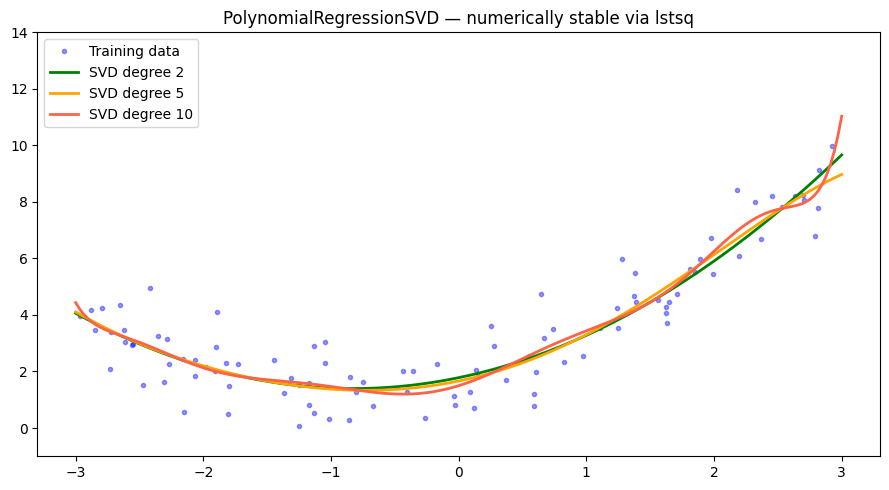
Gradient Descent Polynomial Regression
The PolynomialRegressionGD class fits polynomial regression via gradient descent with adaptive learning rate and convergence tolerance.
%matplotlib inline
import numpy as np
import matplotlib.pyplot as plt

class PolynomialRegressionGD:
    def __init__(self, degree, learning_rate=1e-3, n_iter=10000, tol=1e-4):
        self.degree        = degree
        self.learning_rate = learning_rate
        self.n_iter        = n_iter
        self.tol           = tol

    def _polynomial_features(self, X):
        features = [np.ones((X.shape[0], 1))]
        for d in range(1, self.degree + 1):
            features.append(X ** d)
        return np.hstack(features)

    def _standard_scale(self, X):
        self.mean_ = X.mean(axis=0)
        self.std_  = X.std(axis=0)
        self.std_[self.std_ < 1e-8] = 1.0
        return (X - self.mean_) / self.std_

    def fit(self, X, y):
        X_poly = self._polynomial_features(X)
        X_poly[:, 1:] = self._standard_scale(X_poly[:, 1:])
        m = X_poly.shape[0]
        self.theta = np.zeros((X_poly.shape[1], 1), dtype=np.float64)
        prev_loss  = np.inf
        for i in range(self.n_iter):
            y_pred = np.clip(X_poly @ self.theta, -1e100, 1e100)
            error  = y_pred - y
            loss   = float((error.T @ error) / m)
            if abs(prev_loss - loss) < self.tol:
                break
            prev_loss = loss
            grad      = (2 / m) * X_poly.T @ error
            effective_lr = self.learning_rate / (1 + 0.001 * i)
            self.theta  -= effective_lr * grad

    def predict(self, X):
        X_poly = self._polynomial_features(X)
        X_poly[:, 1:] = (X_poly[:, 1:] - self.mean_) / self.std_
        return np.clip(X_poly @ self.theta, -1e100, 1e100)

np.random.seed(42)
X = 6 * np.random.rand(100, 1).astype(np.float64) - 3
y = (0.5 * X**2 + X + 2 + np.random.randn(100, 1)).astype(np.float64)
X_new = np.linspace(-3, 3, 100).reshape(-1, 1).astype(np.float64)

fig, ax = plt.subplots(figsize=(10, 5))
for style, width, degree, lr in [
    ('r-+', 2, 1,  0.01),
    ('b--', 2, 2,  0.01),
    ('g-',  1, 3,  0.005),
    ('m-',  1, 10, 0.001),
]:
    model = PolynomialRegressionGD(degree=degree, learning_rate=lr, n_iter=20000)
    model.fit(X, y)
    ax.plot(X_new, model.predict(X_new), style, linewidth=width, label=f'Degree {degree}')

ax.plot(X, y, 'k.', alpha=0.3, label='Training data')
ax.set_ylim(-2, 14)
ax.legend()
ax.set_title('PolynomialRegressionGD — gradient descent, no sklearn')
plt.tight_layout()
plt.show()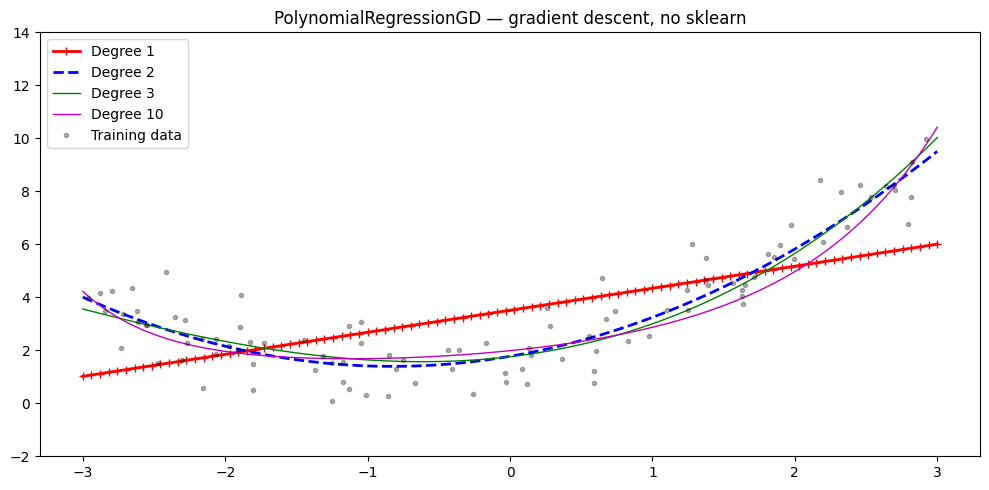
Overfitting vs Underfitting — The Degree Dial
Practical remedy for overfitting: add regularisation (Ridge / Lasso) — covered in the next notebook.
Try It in the Browser
Manually build a degree-2 polynomial design matrix and solve with the Normal Equations.
Guided Practice
Why do we add polynomial features to a regression model?
What is the main risk when the polynomial degree becomes very high?
For two original features x1 and x2, how many terms does degree-2 PolynomialFeatures produce (including bias)?
Why must we scale features after polynomial expansion?
Exercises
Exercise 1 — Find the right degree
Generate data from a cubic function, then fit degrees 1–8. Plot training and validation MSE vs degree to find the sweet spot.
%matplotlib inline
import numpy as np
import matplotlib.pyplot as plt
from sklearn.preprocessing import PolynomialFeatures, StandardScaler
from sklearn.linear_model import LinearRegression
from sklearn.pipeline import make_pipeline
from sklearn.metrics import mean_squared_error

rng = np.random.default_rng(3)
n = 60
X_all = rng.uniform(-3, 3, (n, 1))
y_all = 0.3*X_all.ravel()**3 - X_all.ravel() + rng.normal(0, 1.5, n)

split = int(0.8 * n)
X_tr, X_val = X_all[:split], X_all[split:]
y_tr, y_val = y_all[:split], y_all[split:]

# TODO: for degrees 1..8, fit pipeline, compute train MSE and val MSE
# Plot both on one chart with degree on x-axis
Hint
train_errs, val_errs = [], []
for d in range(1, 9):
    pipe = make_pipeline(PolynomialFeatures(d), StandardScaler(), LinearRegression())
    pipe.fit(X_tr, y_tr)
    train_errs.append(mean_squared_error(y_tr, pipe.predict(X_tr)))
    val_errs.append(mean_squared_error(y_val, pipe.predict(X_val)))
Look for the degree where val MSE stops decreasing — that is your sweet spot.
Exercise 2 — Interaction terms for marketing
Generate synthetic marketing data where sales depend on an interaction between TV and Radio spend. Fit a degree-2 polynomial pipeline and confirm it recovers the interaction coefficient.
import numpy as np
from sklearn.preprocessing import PolynomialFeatures
from sklearn.linear_model import LinearRegression
from sklearn.pipeline import make_pipeline

rng = np.random.default_rng(7)
n = 200
TV    = rng.uniform(50, 250, n)
Radio = rng.uniform(10, 60, n)
X = np.column_stack([TV, Radio])
# True model: sales = 5 + 0.04*TV + 0.2*Radio + 0.003*TV*Radio + noise
y = 5 + 0.04*TV + 0.2*Radio + 0.003*TV*Radio + rng.normal(0, 2, n)

# TODO: fit degree-2 polynomial pipeline (no StandardScaler so coefficients are readable)
# Print feature names and corresponding coefficients
Exercise 3 — Compare all three implementations
On the same dataset (, ), fit degree-2 polynomial regression using:
PolynomialRegressionSVD(from above)PolynomialRegressionGD(from above)sklearn
make_pipeline(PolynomialFeatures(2), StandardScaler(), LinearRegression())
Print the MSE for each and confirm all three agree within a small tolerance.
# Your code here — use PolynomialRegressionSVD, PolynomialRegressionGD, and sklearn pipeline
Common Pitfalls
Summary
Key takeaways
| Concept | One-line meaning |
|---|---|
| Polynomial features | Add and cross-terms as new columns to |
| Still linear in | OLS and gradient descent apply unchanged |
| Degree too low | Underfitting — model misses the curve |
| Degree too high | Overfitting — model fits noise, fails on new data |
| Scale after expanding | Essential for numerical stability |
| Interaction terms | captures joint feature effects |
| Feature count | Grows combinatorially with features and degree |
| Fix for overfitting | Regularisation (Ridge / Lasso) — next notebook |
Next Up — Regularisation

Polynomial features let you fit curves. Regularisation keeps them from going wild.
The next notebook — Regularisation (Ridge & Lasso) — introduces a penalty term added to the loss that shrinks large coefficients. Ridge keeps all features but small, Lasso drives some to zero. Both are solved by a simple modification of the Normal Equations.
Dependencies you already have: the design matrix $\mathbf{X}$, coefficient interpretation, OLS, and the concept that high-degree polynomials overfit without constraint.