
Calibration & Class Imbalance
Learning objectives
By the end of this notebook you will be able to:
Explain why accuracy is misleading on imbalanced datasets.
Demonstrate the accuracy illusion with a concrete example.
Apply class weighting to re-balance the loss function.
Use SMOTE to oversample the minority class synthetically.
Understand what probability calibration means and why it matters.
Build a reliability diagram and interpret it.
Apply Platt scaling and isotonic regression to calibrate a classifier.
Choose the right strategy for a given imbalance scenario.

Business hook — The 95 % lie
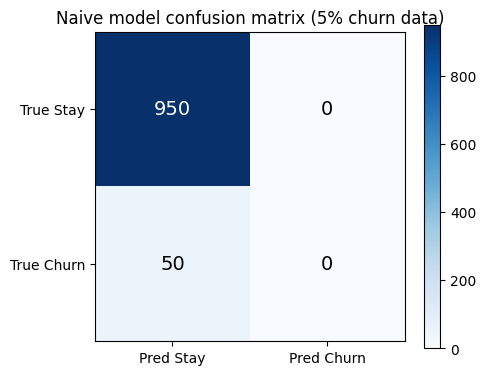
A bank’s fraud detection model achieves 95 % accuracy. The data science team is proud. Then the risk team asks: “How many frauds did you catch?” Answer: zero. Every single transaction was predicted as legitimate — because 95 % of transactions are legitimate.
This is the accuracy illusion — the most common trap in production classification. The model learned to exploit class imbalance rather than detect the minority class.
1. The Accuracy Illusion
%matplotlib inline
import numpy as np
import matplotlib.pyplot as plt
from sklearn.metrics import accuracy_score, classification_report, confusion_matrix

# Simulate 5% churn rate (imbalanced dataset)
np.random.seed(42)
n = 1000
y_true = np.array([0]*950 + [1]*50)

# Naive model: always predict majority class
y_naive = np.zeros(n, dtype=int)

print('=== Naive model (always predict 0) ===')
print(f'Accuracy: {accuracy_score(y_true, y_naive):.3f}')
print(classification_report(y_true, y_naive, target_names=['Stay', 'Churn'], zero_division=0))

# Visualise the confusion matrix
cm = confusion_matrix(y_true, y_naive)
fig, ax = plt.subplots(figsize=(5, 4))
im = ax.imshow(cm, cmap='Blues')
for i in range(2):
    for j in range(2):
        ax.text(j, i, str(cm[i, j]), ha='center', va='center', fontsize=14,
                color='white' if cm[i, j] > cm.max()/2 else 'black')
ax.set_xticks([0, 1]); ax.set_yticks([0, 1])
ax.set_xticklabels(['Pred Stay', 'Pred Churn'])
ax.set_yticklabels(['True Stay', 'True Churn'])
ax.set_title('Naive model confusion matrix (5% churn data)')
plt.colorbar(im)
plt.tight_layout()
plt.show()
=== Naive model (always predict 0) ===
Accuracy: 0.950
precision recall f1-score support
Stay 0.95 1.00 0.97 950
Churn 0.00 0.00 0.00 50
accuracy 0.95 1000
macro avg 0.47 0.50 0.49 1000
weighted avg 0.90 0.95 0.93 1000
2. Class Weights — Re-balancing the Loss
The simplest fix is to weight the loss differently for majority vs minority class samples:
With class_weight='balanced', sklearn sets:
where is the count of class and is the number of classes. Rare class samples count more in the gradient update — the model can no longer ignore them.
When to use class weights:
You want to keep all training data (no information discarded).
The imbalance is moderate (< 100:1).
You are using a model that supports
class_weight(most sklearn classifiers do).
%matplotlib inline
import numpy as np
import matplotlib.pyplot as plt
from sklearn.datasets import make_classification
from sklearn.linear_model import LogisticRegression
from sklearn.model_selection import train_test_split
from sklearn.metrics import f1_score, recall_score, precision_score, roc_auc_score

# Imbalanced dataset: 5% positive class
X, y = make_classification(
    n_samples=2000, n_features=10, n_informative=5,
    weights=[0.95, 0.05], random_state=42, flip_y=0.01
)
X_train, X_test, y_train, y_test = train_test_split(X, y, test_size=0.2, random_state=42, stratify=y)

results = {}
for label, cw in [('No weight', None), ('class_weight=balanced', 'balanced')]:
    m = LogisticRegression(class_weight=cw, max_iter=1000, random_state=42)
    m.fit(X_train, y_train)
    y_pred = m.predict(X_test)
    results[label] = {
        'F1': f1_score(y_test, y_pred, zero_division=0),
        'Recall': recall_score(y_test, y_pred, zero_division=0),
        'Precision': precision_score(y_test, y_pred, zero_division=0),
        'AUC': roc_auc_score(y_test, m.predict_proba(X_test)[:, 1]),
    }

metrics = ['F1', 'Recall', 'Precision', 'AUC']
x = np.arange(len(metrics))
width = 0.35
fig, ax = plt.subplots(figsize=(9, 4))
for i, (label, vals) in enumerate(results.items()):
    ax.bar(x + i*width - width/2, [vals[m] for m in metrics], width, label=label)
ax.set_xticks(x); ax.set_xticklabels(metrics)
ax.set_ylim(0, 1.1)
ax.set_ylabel('Score')
ax.set_title('Effect of Class Weighting on Imbalanced Dataset')
ax.legend()
ax.grid(True, axis='y', alpha=0.3)
plt.tight_layout()
plt.show()

for label, vals in results.items():
    print(f'{label}: F1={vals["F1"]:.3f}, Recall={vals["Recall"]:.3f}, Precision={vals["Precision"]:.3f}, AUC={vals["AUC"]:.3f}')
/Volumes/MacSSD/01_Projects/Chandravesh-ML-Research/projects/jupyter-books/.venv/lib/python3.10/site-packages/sklearn/linear_model/_linear_loss.py:200: RuntimeWarning: divide by zero encountered in matmul
raw_prediction = X @ weights + intercept
/Volumes/MacSSD/01_Projects/Chandravesh-ML-Research/projects/jupyter-books/.venv/lib/python3.10/site-packages/sklearn/linear_model/_linear_loss.py:200: RuntimeWarning: overflow encountered in matmul
raw_prediction = X @ weights + intercept
/Volumes/MacSSD/01_Projects/Chandravesh-ML-Research/projects/jupyter-books/.venv/lib/python3.10/site-packages/sklearn/linear_model/_linear_loss.py:200: RuntimeWarning: invalid value encountered in matmul
raw_prediction = X @ weights + intercept
/Volumes/MacSSD/01_Projects/Chandravesh-ML-Research/projects/jupyter-books/.venv/lib/python3.10/site-packages/sklearn/linear_model/_linear_loss.py:330: RuntimeWarning: divide by zero encountered in matmul
grad[:n_features] = X.T @ grad_pointwise + l2_reg_strength * weights
/Volumes/MacSSD/01_Projects/Chandravesh-ML-Research/projects/jupyter-books/.venv/lib/python3.10/site-packages/sklearn/linear_model/_linear_loss.py:330: RuntimeWarning: overflow encountered in matmul
grad[:n_features] = X.T @ grad_pointwise + l2_reg_strength * weights
/Volumes/MacSSD/01_Projects/Chandravesh-ML-Research/projects/jupyter-books/.venv/lib/python3.10/site-packages/sklearn/linear_model/_linear_loss.py:330: RuntimeWarning: invalid value encountered in matmul
grad[:n_features] = X.T @ grad_pointwise + l2_reg_strength * weights
/Volumes/MacSSD/01_Projects/Chandravesh-ML-Research/projects/jupyter-books/.venv/lib/python3.10/site-packages/sklearn/utils/extmath.py:203: RuntimeWarning: divide by zero encountered in matmul
ret = a @ b
/Volumes/MacSSD/01_Projects/Chandravesh-ML-Research/projects/jupyter-books/.venv/lib/python3.10/site-packages/sklearn/utils/extmath.py:203: RuntimeWarning: overflow encountered in matmul
ret = a @ b
/Volumes/MacSSD/01_Projects/Chandravesh-ML-Research/projects/jupyter-books/.venv/lib/python3.10/site-packages/sklearn/utils/extmath.py:203: RuntimeWarning: invalid value encountered in matmul
ret = a @ b
/Volumes/MacSSD/01_Projects/Chandravesh-ML-Research/projects/jupyter-books/.venv/lib/python3.10/site-packages/sklearn/utils/extmath.py:203: RuntimeWarning: divide by zero encountered in matmul
ret = a @ b
/Volumes/MacSSD/01_Projects/Chandravesh-ML-Research/projects/jupyter-books/.venv/lib/python3.10/site-packages/sklearn/utils/extmath.py:203: RuntimeWarning: overflow encountered in matmul
ret = a @ b
/Volumes/MacSSD/01_Projects/Chandravesh-ML-Research/projects/jupyter-books/.venv/lib/python3.10/site-packages/sklearn/utils/extmath.py:203: RuntimeWarning: invalid value encountered in matmul
ret = a @ b
/Volumes/MacSSD/01_Projects/Chandravesh-ML-Research/projects/jupyter-books/.venv/lib/python3.10/site-packages/sklearn/linear_model/_linear_loss.py:200: RuntimeWarning: divide by zero encountered in matmul
raw_prediction = X @ weights + intercept
/Volumes/MacSSD/01_Projects/Chandravesh-ML-Research/projects/jupyter-books/.venv/lib/python3.10/site-packages/sklearn/linear_model/_linear_loss.py:200: RuntimeWarning: overflow encountered in matmul
raw_prediction = X @ weights + intercept
/Volumes/MacSSD/01_Projects/Chandravesh-ML-Research/projects/jupyter-books/.venv/lib/python3.10/site-packages/sklearn/linear_model/_linear_loss.py:200: RuntimeWarning: invalid value encountered in matmul
raw_prediction = X @ weights + intercept
/Volumes/MacSSD/01_Projects/Chandravesh-ML-Research/projects/jupyter-books/.venv/lib/python3.10/site-packages/sklearn/linear_model/_linear_loss.py:330: RuntimeWarning: divide by zero encountered in matmul
grad[:n_features] = X.T @ grad_pointwise + l2_reg_strength * weights
/Volumes/MacSSD/01_Projects/Chandravesh-ML-Research/projects/jupyter-books/.venv/lib/python3.10/site-packages/sklearn/linear_model/_linear_loss.py:330: RuntimeWarning: overflow encountered in matmul
grad[:n_features] = X.T @ grad_pointwise + l2_reg_strength * weights
/Volumes/MacSSD/01_Projects/Chandravesh-ML-Research/projects/jupyter-books/.venv/lib/python3.10/site-packages/sklearn/linear_model/_linear_loss.py:330: RuntimeWarning: invalid value encountered in matmul
grad[:n_features] = X.T @ grad_pointwise + l2_reg_strength * weights
/Volumes/MacSSD/01_Projects/Chandravesh-ML-Research/projects/jupyter-books/.venv/lib/python3.10/site-packages/sklearn/utils/extmath.py:203: RuntimeWarning: divide by zero encountered in matmul
ret = a @ b
/Volumes/MacSSD/01_Projects/Chandravesh-ML-Research/projects/jupyter-books/.venv/lib/python3.10/site-packages/sklearn/utils/extmath.py:203: RuntimeWarning: overflow encountered in matmul
ret = a @ b
/Volumes/MacSSD/01_Projects/Chandravesh-ML-Research/projects/jupyter-books/.venv/lib/python3.10/site-packages/sklearn/utils/extmath.py:203: RuntimeWarning: invalid value encountered in matmul
ret = a @ b
/Volumes/MacSSD/01_Projects/Chandravesh-ML-Research/projects/jupyter-books/.venv/lib/python3.10/site-packages/sklearn/utils/extmath.py:203: RuntimeWarning: divide by zero encountered in matmul
ret = a @ b
/Volumes/MacSSD/01_Projects/Chandravesh-ML-Research/projects/jupyter-books/.venv/lib/python3.10/site-packages/sklearn/utils/extmath.py:203: RuntimeWarning: overflow encountered in matmul
ret = a @ b
/Volumes/MacSSD/01_Projects/Chandravesh-ML-Research/projects/jupyter-books/.venv/lib/python3.10/site-packages/sklearn/utils/extmath.py:203: RuntimeWarning: invalid value encountered in matmul
ret = a @ b
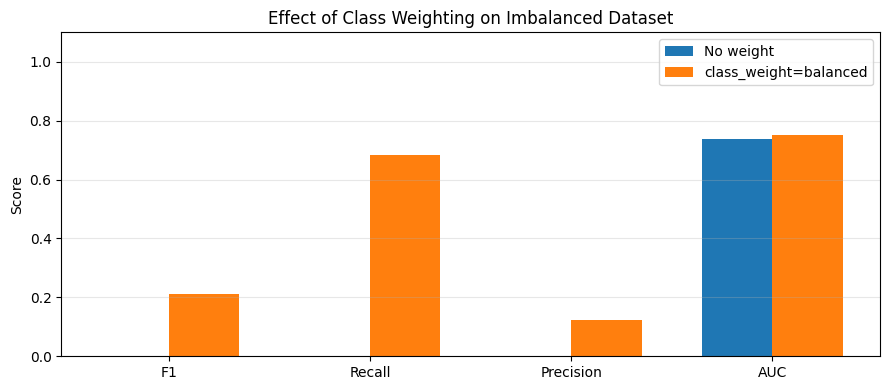
No weight: F1=0.000, Recall=0.000, Precision=0.000, AUC=0.737
class_weight=balanced: F1=0.210, Recall=0.682, Precision=0.124, AUC=0.753
3. SMOTE — Synthetic Minority Over-Sampling
SMOTE (Chawla et al., 2002) creates synthetic minority class samples by interpolating between existing minority samples and their k nearest neighbours:
This avoids the exact duplication problem of naive random oversampling (which just copies existing minority examples).
When to use SMOTE vs class weights:
| Strategy | Best for | Risk |
|---|---|---|
| Class weights | Moderate imbalance, any model | May not handle extreme imbalance |
| Random oversampling | Quick fix | Overfits to existing minority examples |
| SMOTE | Tree models, extreme imbalance | Can create noise in overlapping regions |
| Random undersampling | Very large datasets | Throws away majority class information |
Important: always apply resampling only to the training set — never to validation or test.
%matplotlib inline
import numpy as np
import matplotlib.pyplot as plt
from sklearn.datasets import make_classification
from sklearn.model_selection import train_test_split
from sklearn.metrics import f1_score

# SMOTE from scratch (simplified 1D illustration)
def simple_smote(X_minority, n_synthetic, k=3, random_state=42):
    np.random.seed(random_state)
    synthetic = []
    for _ in range(n_synthetic):
        i = np.random.randint(len(X_minority))
        xi = X_minority[i]
        # Find k nearest neighbours
        dists = np.linalg.norm(X_minority - xi, axis=1)
        dists[i] = np.inf
        nn_idx = np.argsort(dists)[:k]
        nn = X_minority[np.random.choice(nn_idx)]
        lam = np.random.uniform(0, 1)
        synthetic.append(xi + lam * (nn - xi))
    return np.array(synthetic)

# Generate 2D imbalanced data for visualisation
X, y = make_classification(
    n_samples=300, n_features=2, n_redundant=0, n_informative=2,
    weights=[0.9, 0.1], random_state=42, class_sep=1.5
)

X_min = X[y == 1]
n_synthetic = len(X[y == 0]) - len(X_min)  # balance the classes
X_synthetic = simple_smote(X_min, n_synthetic)

fig, axes = plt.subplots(1, 2, figsize=(12, 5))

axes[0].scatter(X[y==0, 0], X[y==0, 1], c='steelblue', alpha=0.4, label='Majority (0)', s=20)
axes[0].scatter(X[y==1, 0], X[y==1, 1], c='red', alpha=0.8, label='Minority (1)', s=50)
axes[0].set_title(f'Before SMOTE: {sum(y==0)} vs {sum(y==1)} samples')
axes[0].legend()
axes[0].grid(True)

axes[1].scatter(X[y==0, 0], X[y==0, 1], c='steelblue', alpha=0.4, label='Majority (0)', s=20)
axes[1].scatter(X[y==1, 0], X[y==1, 1], c='red', alpha=0.8, label='Original minority', s=50)
axes[1].scatter(X_synthetic[:, 0], X_synthetic[:, 1], c='orange', alpha=0.6, label='SMOTE synthetic', s=20, marker='+')
axes[1].set_title(f'After SMOTE: balanced {sum(y==0)} vs {sum(y==1)+len(X_synthetic)}')
axes[1].legend()
axes[1].grid(True)

plt.suptitle('SMOTE: Synthetic Minority Over-Sampling', fontsize=12)
plt.tight_layout()
plt.show()

# Compare with imbalanced-learn if available
try:
    from imblearn.over_sampling import SMOTE
    from sklearn.linear_model import LogisticRegression
    X_train, X_test, y_train, y_test = train_test_split(X, y, test_size=0.2, random_state=42, stratify=y)
    sm = SMOTE(random_state=42)
    X_res, y_res = sm.fit_resample(X_train, y_train)
    m1 = LogisticRegression(max_iter=1000).fit(X_train, y_train)
    m2 = LogisticRegression(max_iter=1000).fit(X_res, y_res)
    print(f'F1 without SMOTE: {f1_score(y_test, m1.predict(X_test)):.3f}')
    print(f'F1 with SMOTE:    {f1_score(y_test, m2.predict(X_test)):.3f}')
except ImportError:
    print('imbalanced-learn not installed. Install with: pip install imbalanced-learn')
    print('SMOTE visualisation complete.')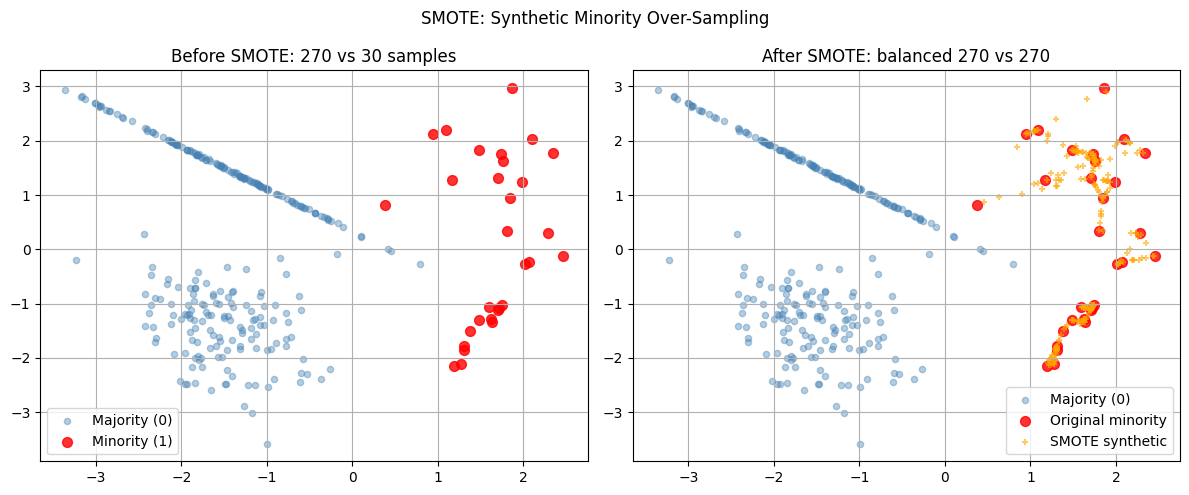
imbalanced-learn not installed. Install with: pip install imbalanced-learn
SMOTE visualisation complete.
4. Probability Calibration
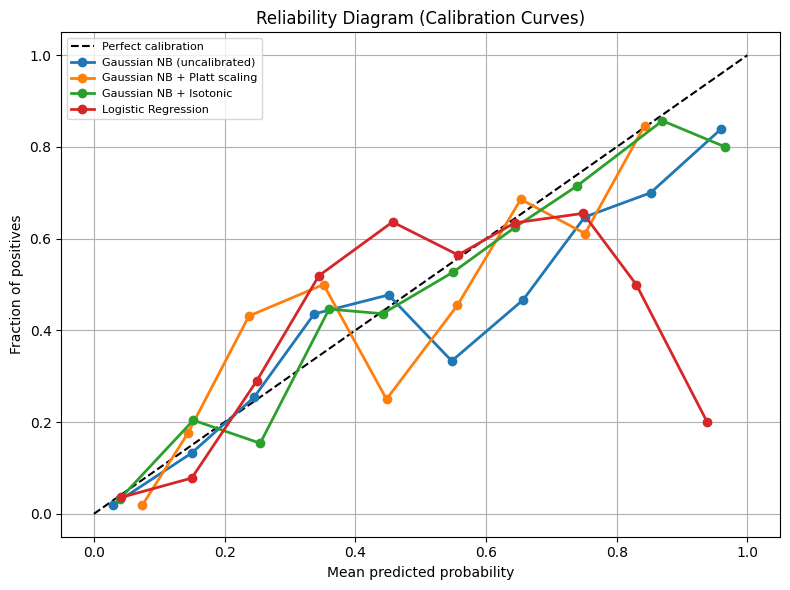
A calibrated classifier is one where the predicted probability accurately reflects the empirical frequency. If a calibrated model says “80 % churn probability”, then roughly 80 of every 100 such predictions should actually churn.
Why calibration matters for business:
Setting decision thresholds (“call customer if churn prob > 0.7”)
Expected value calculations ()
Stacking models: miscalibrated outputs feed bad signals to the next layer
Reliability diagram (calibration curve): plot mean predicted probability vs empirical frequency per bin. A perfectly calibrated model follows the diagonal.
| Model type | Typical calibration issue |
|---|---|
| Naive Bayes | Overconfident — pushes probs to 0/1 |
| Logistic Regression | Well-calibrated by design |
| Random Forest | Under-confident — probs cluster near 0.5 |
| Gradient Boosting | Under-confident near extremes |
| SVM | Poor — scores not probabilities |
Calibration methods:
Platt scaling: fit a logistic regression on values (sigmoid transform)
Isotonic regression: fit a monotonic step function — more flexible, needs more data
%matplotlib inline
import numpy as np
import matplotlib.pyplot as plt
from sklearn.datasets import make_classification
from sklearn.model_selection import train_test_split
from sklearn.naive_bayes import GaussianNB
from sklearn.linear_model import LogisticRegression
from sklearn.calibration import calibration_curve, CalibratedClassifierCV

X, y = make_classification(
    n_samples=2000, n_features=10, n_informative=5,
    weights=[0.7, 0.3], random_state=42
)
X_train, X_test, y_train, y_test = train_test_split(X, y, test_size=0.3, random_state=42)

models = {
    'Gaussian NB (uncalibrated)': GaussianNB(),
    'Gaussian NB + Platt scaling': CalibratedClassifierCV(GaussianNB(), cv=5, method='sigmoid'),
    'Gaussian NB + Isotonic':      CalibratedClassifierCV(GaussianNB(), cv=5, method='isotonic'),
    'Logistic Regression':         LogisticRegression(max_iter=1000, random_state=42),
}

plt.figure(figsize=(8, 6))
plt.plot([0, 1], [0, 1], 'k--', label='Perfect calibration')

for name, m in models.items():
    m.fit(X_train, y_train)
    prob_pos = m.predict_proba(X_test)[:, 1]
    fraction_of_positives, mean_predicted_value = calibration_curve(y_test, prob_pos, n_bins=10)
    plt.plot(mean_predicted_value, fraction_of_positives, marker='o', linewidth=2, label=name)

plt.xlabel('Mean predicted probability')
plt.ylabel('Fraction of positives')
plt.title('Reliability Diagram (Calibration Curves)')
plt.legend(loc='upper left', fontsize=8)
plt.grid(True)
plt.tight_layout()
plt.show()
/Volumes/MacSSD/01_Projects/Chandravesh-ML-Research/projects/jupyter-books/.venv/lib/python3.10/site-packages/sklearn/linear_model/_linear_loss.py:200: RuntimeWarning: divide by zero encountered in matmul
raw_prediction = X @ weights + intercept
/Volumes/MacSSD/01_Projects/Chandravesh-ML-Research/projects/jupyter-books/.venv/lib/python3.10/site-packages/sklearn/linear_model/_linear_loss.py:200: RuntimeWarning: overflow encountered in matmul
raw_prediction = X @ weights + intercept
/Volumes/MacSSD/01_Projects/Chandravesh-ML-Research/projects/jupyter-books/.venv/lib/python3.10/site-packages/sklearn/linear_model/_linear_loss.py:200: RuntimeWarning: invalid value encountered in matmul
raw_prediction = X @ weights + intercept
/Volumes/MacSSD/01_Projects/Chandravesh-ML-Research/projects/jupyter-books/.venv/lib/python3.10/site-packages/sklearn/linear_model/_linear_loss.py:330: RuntimeWarning: divide by zero encountered in matmul
grad[:n_features] = X.T @ grad_pointwise + l2_reg_strength * weights
/Volumes/MacSSD/01_Projects/Chandravesh-ML-Research/projects/jupyter-books/.venv/lib/python3.10/site-packages/sklearn/linear_model/_linear_loss.py:330: RuntimeWarning: overflow encountered in matmul
grad[:n_features] = X.T @ grad_pointwise + l2_reg_strength * weights
/Volumes/MacSSD/01_Projects/Chandravesh-ML-Research/projects/jupyter-books/.venv/lib/python3.10/site-packages/sklearn/linear_model/_linear_loss.py:330: RuntimeWarning: invalid value encountered in matmul
grad[:n_features] = X.T @ grad_pointwise + l2_reg_strength * weights
/Volumes/MacSSD/01_Projects/Chandravesh-ML-Research/projects/jupyter-books/.venv/lib/python3.10/site-packages/sklearn/utils/extmath.py:203: RuntimeWarning: divide by zero encountered in matmul
ret = a @ b
/Volumes/MacSSD/01_Projects/Chandravesh-ML-Research/projects/jupyter-books/.venv/lib/python3.10/site-packages/sklearn/utils/extmath.py:203: RuntimeWarning: overflow encountered in matmul
ret = a @ b
/Volumes/MacSSD/01_Projects/Chandravesh-ML-Research/projects/jupyter-books/.venv/lib/python3.10/site-packages/sklearn/utils/extmath.py:203: RuntimeWarning: invalid value encountered in matmul
ret = a @ b
5. Threshold Selection under Imbalance
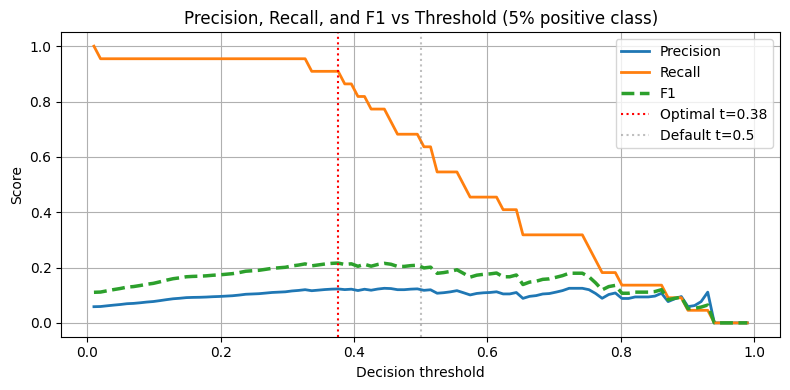
The default 0.5 threshold is derived assuming balanced classes. On imbalanced data, the optimal threshold is typically lower for the positive class (to increase recall).
Strategy: sweep the threshold and optimise for the business metric (F1, expected value, or a precision-recall tradeoff).
%matplotlib inline
import numpy as np
import matplotlib.pyplot as plt
from sklearn.datasets import make_classification
from sklearn.linear_model import LogisticRegression
from sklearn.model_selection import train_test_split
from sklearn.metrics import precision_score, recall_score, f1_score

X, y = make_classification(
    n_samples=2000, n_features=10, n_informative=5,
    weights=[0.95, 0.05], random_state=42
)
X_train, X_test, y_train, y_test = train_test_split(X, y, test_size=0.2, random_state=42, stratify=y)

m = LogisticRegression(class_weight='balanced', max_iter=1000, random_state=42)
m.fit(X_train, y_train)
probs = m.predict_proba(X_test)[:, 1]

thresholds = np.linspace(0.01, 0.99, 100)
precisions, recalls, f1s = [], [], []
for t in thresholds:
    y_pred_t = (probs >= t).astype(int)
    precisions.append(precision_score(y_test, y_pred_t, zero_division=0))
    recalls.append(recall_score(y_test, y_pred_t, zero_division=0))
    f1s.append(f1_score(y_test, y_pred_t, zero_division=0))

best_t = thresholds[np.argmax(f1s)]
print(f'Optimal threshold for max F1: {best_t:.3f}')
print(f'At threshold 0.5: F1={f1_score(y_test, (probs>=0.5).astype(int)):.3f}')
print(f'At optimal threshold {best_t:.3f}: F1={max(f1s):.3f}')

plt.figure(figsize=(8, 4))
plt.plot(thresholds, precisions, label='Precision', linewidth=2)
plt.plot(thresholds, recalls, label='Recall', linewidth=2)
plt.plot(thresholds, f1s, label='F1', linewidth=2.5, linestyle='--')
plt.axvline(best_t, color='red', linestyle=':', label=f'Optimal t={best_t:.2f}')
plt.axvline(0.5, color='gray', linestyle=':', alpha=0.5, label='Default t=0.5')
plt.xlabel('Decision threshold')
plt.ylabel('Score')
plt.title('Precision, Recall, and F1 vs Threshold (5% positive class)')
plt.legend()
plt.grid(True)
plt.tight_layout()
plt.show()
/Volumes/MacSSD/01_Projects/Chandravesh-ML-Research/projects/jupyter-books/.venv/lib/python3.10/site-packages/sklearn/linear_model/_linear_loss.py:200: RuntimeWarning: divide by zero encountered in matmul
raw_prediction = X @ weights + intercept
/Volumes/MacSSD/01_Projects/Chandravesh-ML-Research/projects/jupyter-books/.venv/lib/python3.10/site-packages/sklearn/linear_model/_linear_loss.py:200: RuntimeWarning: overflow encountered in matmul
raw_prediction = X @ weights + intercept
/Volumes/MacSSD/01_Projects/Chandravesh-ML-Research/projects/jupyter-books/.venv/lib/python3.10/site-packages/sklearn/linear_model/_linear_loss.py:200: RuntimeWarning: invalid value encountered in matmul
raw_prediction = X @ weights + intercept
/Volumes/MacSSD/01_Projects/Chandravesh-ML-Research/projects/jupyter-books/.venv/lib/python3.10/site-packages/sklearn/linear_model/_linear_loss.py:330: RuntimeWarning: divide by zero encountered in matmul
grad[:n_features] = X.T @ grad_pointwise + l2_reg_strength * weights
/Volumes/MacSSD/01_Projects/Chandravesh-ML-Research/projects/jupyter-books/.venv/lib/python3.10/site-packages/sklearn/linear_model/_linear_loss.py:330: RuntimeWarning: overflow encountered in matmul
grad[:n_features] = X.T @ grad_pointwise + l2_reg_strength * weights
/Volumes/MacSSD/01_Projects/Chandravesh-ML-Research/projects/jupyter-books/.venv/lib/python3.10/site-packages/sklearn/linear_model/_linear_loss.py:330: RuntimeWarning: invalid value encountered in matmul
grad[:n_features] = X.T @ grad_pointwise + l2_reg_strength * weights
/Volumes/MacSSD/01_Projects/Chandravesh-ML-Research/projects/jupyter-books/.venv/lib/python3.10/site-packages/sklearn/utils/extmath.py:203: RuntimeWarning: divide by zero encountered in matmul
ret = a @ b
/Volumes/MacSSD/01_Projects/Chandravesh-ML-Research/projects/jupyter-books/.venv/lib/python3.10/site-packages/sklearn/utils/extmath.py:203: RuntimeWarning: overflow encountered in matmul
ret = a @ b
/Volumes/MacSSD/01_Projects/Chandravesh-ML-Research/projects/jupyter-books/.venv/lib/python3.10/site-packages/sklearn/utils/extmath.py:203: RuntimeWarning: invalid value encountered in matmul
ret = a @ b
Optimal threshold for max F1: 0.376
At threshold 0.5: F1=0.210
At optimal threshold 0.376: F1=0.216
6. Try It in the Browser
See the accuracy illusion in pure Python — then observe how class weights change the outcome.
import math
import random

random.seed(42)

def sigmoid(z):
    return 1.0 / (1.0 + math.exp(-max(-500, min(500, z))))

# 5% positive class
n_neg, n_pos = 950, 50
X = [(random.gauss(-1, 1), 0) for _ in range(n_neg)] + [(random.gauss(1, 1), 1) for _ in range(n_pos)]
random.shuffle(X)
xs, ys = [x for x, y in X], [y for x, y in X]

def train_lr(xs, ys, w_pos=1.0, lr=0.5, epochs=200):
    w, b = 0.0, 0.0
    for _ in range(epochs):
        for xi, yi in zip(xs, ys):
            weight = w_pos if yi == 1 else 1.0
            yhat = sigmoid(w * xi + b)
            err = yhat - yi
            w -= lr * weight * err * xi / len(xs)
            b -= lr * weight * err / len(xs)
    return w, b

def evaluate(w, b, xs, ys, threshold=0.5):
    preds = [1 if sigmoid(w*xi + b) >= threshold else 0 for xi in xs]
    acc = sum(p == y for p, y in zip(preds, ys)) / len(ys)
    tp = sum(p == 1 and y == 1 for p, y in zip(preds, ys))
    fp = sum(p == 1 and y == 0 for p, y in zip(preds, ys))
    fn = sum(p == 0 and y == 1 for p, y in zip(preds, ys))
    prec = tp / (tp + fp) if (tp + fp) > 0 else 0.0
    rec = tp / (tp + fn) if (tp + fn) > 0 else 0.0
    f1 = 2 * prec * rec / (prec + rec) if (prec + rec) > 0 else 0.0
    return acc, prec, rec, f1

# Without class weights
w1, b1 = train_lr(xs, ys, w_pos=1.0)
acc1, prec1, rec1, f1_1 = evaluate(w1, b1, xs, ys)
print('Without class weights:')
print(f'  Accuracy={acc1:.2%}, Precision={prec1:.2%}, Recall={rec1:.2%}, F1={f1_1:.2%}')

# With class weights (19x for minority)
w2, b2 = train_lr(xs, ys, w_pos=19.0)
acc2, prec2, rec2, f1_2 = evaluate(w2, b2, xs, ys)
print('With class weights (w_pos=19):')
print(f'  Accuracy={acc2:.2%}, Precision={prec2:.2%}, Recall={rec2:.2%}, F1={f1_2:.2%}')
Knowledge Check
Why can accuracy be misleading on a highly imbalanced dataset?
What is the purpose of probability calibration?
Where should SMOTE be applied in a cross-validation pipeline?
Why does the default threshold of 0.5 often underperform on imbalanced datasets?
Exercises
Exercise 1 — SMOTE vs Class Weights
On the imbalanced dataset from cell 6, compare three strategies: (a) no adjustment, (b) class_weight='balanced', (c) SMOTE (with imblearn). Compute F1, recall, and precision for each. Which strategy gives the highest recall?
%matplotlib inline
# Exercise 1: SMOTE vs class weights comparison
# Your code here
Exercise 2 — Calibration on a Random Forest
Train a RandomForestClassifier on a binary dataset. Plot its reliability diagram (uncalibrated). Then wrap it with CalibratedClassifierCV(method='isotonic') and plot again. How much does the diagonal alignment improve?
%matplotlib inline
# Exercise 2: Random Forest calibration
# Your code here
Common Pitfalls
Summary
Accuracy illusion: on 95 % negative data, always-negative model achieves 95 % accuracy with zero business value.
Class weights: — rare class counts more in the loss gradient.
SMOTE: creates synthetic minority samples by interpolating between existing minority examples and their k-NN.
Calibration: reliability diagram shows whether matches empirical frequency. Logistic regression is well-calibrated; Naive Bayes and tree models often are not.
Calibration methods: Platt scaling (logistic on scores), isotonic regression (monotone step function).
Threshold: sweep 0 to 1 and optimise for F1 or business metric; default 0.5 is rarely optimal under imbalance.

What’s Next?
We’ve seen that accuracy is not enough — but what metrics are the right ones? In classification_metrics.ipynb we go deep into the full classification metrics toolkit: precision, recall, F1, AUC-ROC, AUC-PR, and when each one tells the right story.
Coming up:
Classification Metrics — confusion matrix in depth, ROC vs PR curves, macro vs micro averaging
Lab — Churn Prediction end-to-end with all the tools